
For system, network and cloud administrators

Whenever I need to check my hardware information in order to see if a hardware upgrade is supported officially on my desktop/laptop/server or if all of my software drivers are up to date, I always find myself in need of first finding my motherboard details. I’ve written a small tutorial on how to achieve this.

What you should know about VPNs
VPN stands for Virtual Private Network. Basically, it will allow you to access a private network. For example: you’re home and you are using your own network but you need to access the network of your work office. Well, that’s where a VPN connection will help you. Your work office will provide you the credentials of their VPN server so you can access their private network from wherever you are. This article aims to show you how you can create a VPN connection and connect to it.

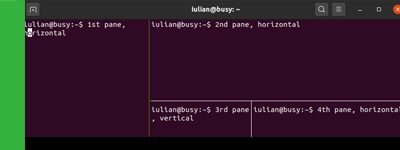
tmux is a very useful tool when working with the terminal. It basically allows you to start multiple sessions and each one of these sessions can have multiple panes inside it. tmux is a terminal tool focused on window and session management. tmux is available for: Debian/Ubuntu, Fedora, RHEL/CentOS, Arch Linux, OpenSUSE, macOS.
On: Ubuntu 20.04 LTS
Since Canonical uses dpkg as their package manager, their software often ends with the .deb extension.
- Go to the official Ubuntu packages.
- Find your desired Ubuntu .deb package by browsing the appropiate Ubuntu version that fits your need or by searching the name of the package.
- Once you found the Ubuntu package, choose the nearest mirror to your location in order to download the package (North America, Europe, Asia, etc.).
- Install your .deb package using:
sudo dpkg -i the-name-of-your-deb-package.debFollow BusyNetwork


